

Platform Purpose
About SHRTX
SHRTX builds practical browser tools focused on fast workflows, local processing, and simple everyday utilities.
The Name SHRTX
The name SHRTX reflects our core philosophy. It is built around two key principles.
- ShortSimpler workflows and fewer unnecessary steps.
- XSpeed, modern execution, and a performance focus.
Quick Facts
- • No registration required
- • Built using web standards
- • Local browser processing
- • Direct export of results
Our Tool Ecosystem
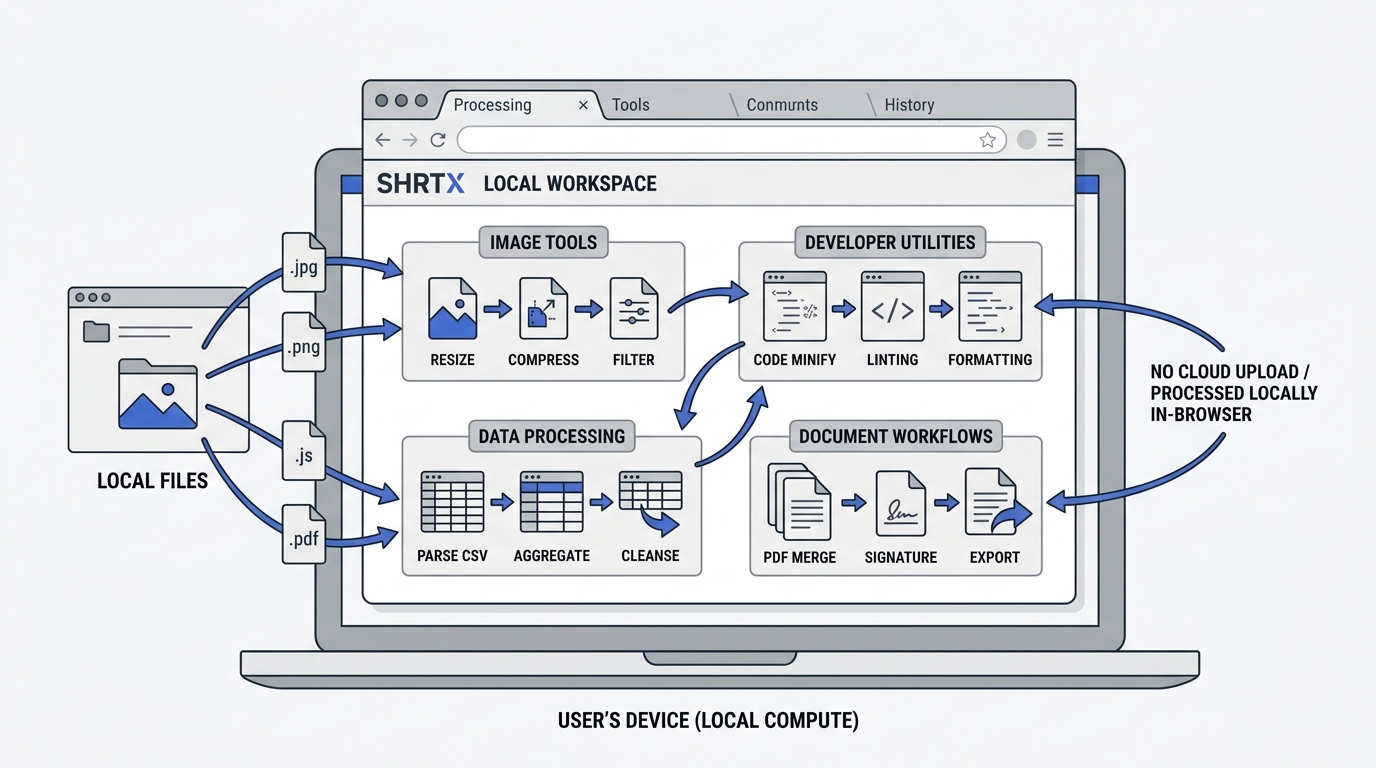
We build single-purpose utilities powered by optimized, client-side processing engines. Instead of presenting separate tools for every minor format variation, we group capabilities around clear user workflows and intents.
Image Processing
Unified engines for format conversion, quality compression, canvas-based resizing, and metadata inspection across PNG, JPEG, WebP, and raw assets.
Developer & Web Utilities
Syntax formatting, validation engines for JSON and SQL, code minification helpers, and custom markup/SVG builders.
Cryptographic Security
Client-side hashing routines, key viewers, and random token generators powered entirely by native browser SubtleCrypto APIs.
Data & Document Workflows
Local document parsing, CSV-to-JSON mappings, text statistics, string analysis, and PDF merging routines.
Calculators & Conversions
Unit converters, financial calculators, and mathematical solvers running instant static multipliers and algorithms locally on your device.
Browser-First Execution
SHRTX prefers browser-side execution when technically practical. Local processing when supported.
By utilizing modern browser APIs, local processing, Web Workers, and WebAssembly, we process data directly in your browser. This reduces unnecessary dependency on remote servers, improves speed, and maintains transparency.
Traditional Remote Flow
SHRTX Browser-First Flow
Understanding File Processing
We maintain a clear distinction when describing how files are handled on our platform.
Selecting, opening, or importing a local file in your browser is not an upload. Your file is loaded into the browser memory on your device.
An upload means transferring files from your device to our servers.
For our browser-based tools, no server upload is required. Local processing when supported. We use terms like select file, open file, import file, or process locally to describe these local workflows.
Technical Limitations
Browser-based processing has clear limits. These include device capability, memory constraints, browser restrictions, and workload size.
SHRTX Web is designed around browser execution. Tool capabilities are planned around browser technology, performance limits, and reliable user experience.
SHRTX TECHNOLOGIES
Trade name of VISHWANATH TEC SYSTEMS
SHRTX is operated by SHRTX TECHNOLOGIES. The platform was founded by Vishwanath Tiwari to build lightweight, privacy-focused utility tools. We are committed to building clean web infrastructure that respects user control and simplifies digital workflows.